
Appearance
Global Settings
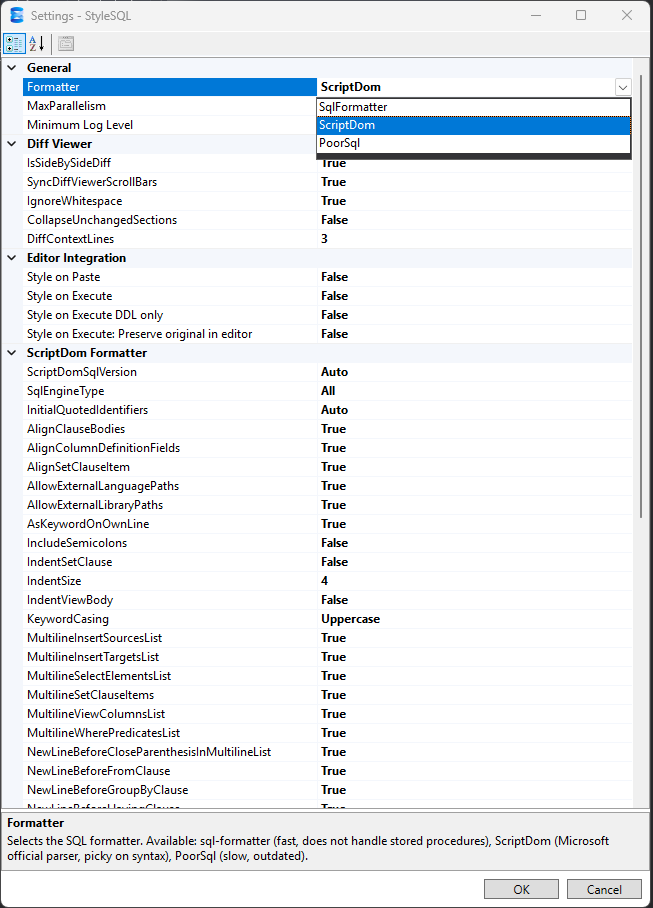
Customize how StyleSQL scans, formats, diffs, and integrates with the editor. Settings are saved per‑user and applied immediately.
Where settings are stored
%AppData%/StyleSql/settings.json
Categories and key options
General
- Max Parallelism — Maximum number of concurrent tasks used for scanning, styling, and diffing.
- Minimum Log Level — Lowest severity of log messages to record (Trace, Debug, Info, ...).
Style Database
- Include Views — show views in results after scanning.
- Include Procedures — show stored procedures in results after scanning.
- Include Functions — show functions in results after scanning.
- Include Triggers — show triggers in results after scanning.
- Script Only — generate scripts without applying to the database.
- Excluded Schemas — skip schemas by name (comma‑separated).
- Excluded Objects — skip specific objects (
schema.name).
Diff Viewer
- Side‑by‑side vs inline diff
- Sync Scroll Bars — scroll left and right panes together
- Ignore whitespace — hide whitespace‑only changes
- Changes only — collapse unchanged sections
- Diff context lines — how many lines to show around changes (default: 3)
Formatter Options
- Formatter — choose
ScriptDom,SqlFormatter, orPoorSQL.
ScriptDom Formatter Options
- SQL Server Version —
Autodetects the connected server. - SQL Engine Type — target engine family for script generation.
- Initial QUOTED_IDENTIFIER —
Auto,On, orOff. - Include Semicolons — append
;after each statement. - Keyword Casing — control keyword casing.
- Indent Size — spaces per indent.
- Align Clause Bodies — align FROM/WHERE/GROUP BY bodies.
- Align Column Definition Fields — align column name/type/constraints.
- Align SET Clause Items — align items within UPDATE ... SET ... clauses (when the SET list spans multiple lines)
- Allow External Language Paths / Library Paths
- AS on Own Line — ScriptDom quirk: only CREATE VIEW headers honor this; procedures/functions and aliases are currently unchanged
- Indent SET Clause
- Indent VIEW Body
- Multiline INSERT Sources/Targets Lists — split INSERT sources/targets across lines when multiline; single-row INSERTs are left unchanged
- Multiline SELECT Elements List
- Multiline SET Clause Items
- Multiline VIEW Columns List
- Multiline WHERE Predicates List
- New Line Before ) in Multiline Lists — add a newline before the closing ) in multi-line lists that are already wrapped across lines (for example IN(...) lists)
- New Line Before FROM / JOIN / WHERE / ORDER BY / GROUP BY / HAVING / OFFSET / OUTPUT / WINDOW — start each clause keyword on its own line
- New Line Before ( in Multiline Lists
- Blank Lines After Statement — number of blank lines to insert after statements. This option currently appears to have no effect in ScriptDom
- New Line for Index Definitions
- New Line for CHECK Constraints
- Space Between Data Type and Parameters
- Space Between Parameters in Data Type
SqlFormatter Options
- Indentation Style — Tabs or Spaces
- Spaces Per Indent — spaces per indentation level (when using spaces)
- Uppercase Keywords — convert SQL keywords to UPPERCASE
- Blank Lines Between Queries — blank lines after non-inline batch separators such as
GO; semicolon-only scripts are unchanged - Max Column Length — controls when comma-separated lists inside parentheses wrap to multiple lines; does not enforce a global line width
- Tight Block Parentheses — omit spaces/line breaks around block parentheses
PoorSQL Options
- Indentation Style — Tabs or Spaces
- Spaces Per Indent — spaces per indentation level (or tab width)
- Max Line Width — maximum line width before wrapping
- Statement Breaks — blank lines inserted between statements
- Clause Breaks — blank lines inserted between clauses
- Expand Comma Lists — expand comma-separated lists onto multiple lines
- Trailing Commas — append trailing commas on expanded lists
- Space After Expanded Comma — add a space after commas in expanded lists
- Expand Boolean Expressions — put boolean expressions on multiple lines
- Expand CASE Statements — expand CASE statements
- Expand BETWEEN Conditions — expand BETWEEN conditions
- Expand IN Lists — expand IN lists
- Break JOIN ... ON Sections — place JOIN ... ON on separate lines
- Uppercase Keywords — uppercase SQL keywords
- Keyword Standardization — normalize keyword casing before formatting
Editor Integration
- Style on Execute — format when executing queries from the editor
- DDL only — restrict styling to CREATE/ALTER on execute, when Style on Execute is enabled
- Restore original — keep a copy and restore after execution, when Style on Execute is enabled
- Style on Paste — format SQL pasted into the editor
Update Check
- Enable Update Checks — automatically check for updates on startup.
- Update Check Frequency — how often to check.
Tips
- Settings take effect the next time you run an operation; use Rescan in the Style Database window to re‑apply.
- If a formatter is missing (e.g.,
PoorSQLbinary), the dialog guides you to install it before saving. - Log files are stored in
%LocalAppData%/StyleSql/logs